


Overview
We’ve dealt with PHP protectors for years. Zend Guard, ionCube, SourceGuardian, the usual set. They show up, you recognize the pattern, and you work around it.
What we didn’t really have before was a reason to look under the hood. How they hook Zend, how they feed code into the engine, and what actually runs when the “source” is just a blob. That changed during an internal engagement. The plan was to do a normal code review assessment, but the “code” we got was an ionCube protected blob that didn’t make sense to read as PHP. At that point, it stopped being a review of the application, and turned into a closer look at the loader and the execution path.
This research came out of independent verification and validation testing on an internal application. It was not about breaking or rewriting anything, but more into validating integrity. What code is being executed, where it comes from, and whether it matches what the application is supposed to run.
This is not a “one click, get the source code” type of post. The focus here is on how ionCube actually runs things, and what it’s doing under the hood when it executes code through the Zend VM.
While digging for prior work, there honestly isn’t much out there on ionCube. Most of what shows up is noise, or people claiming they can “decode ionCube instantly” for money.
One of the few public write-ups that’s still worth a look is Stealing from Thieves (Mohamed Saher). Some details in it are dated and a few parts won’t line up with modern loader behavior, but it’s still one of the few public references that actually goes under the hood and is worth reading for context.
Quick Start
A static approach was not promising here. The ionCube loader is huge, and it is not written in a way that makes static reversing possible (or maybe it is). On top of that, many of the symbols are not helpful:
$ readelf -s ioncube_loader_lin_8.3.so | grep -i func
569: 000000000012b160    39 FUNC    GLOBAL DEFAULT   12 r9_
570: 00000000001299b0    45 FUNC    GLOBAL DEFAULT   12 BN_
571: 0000000000129e10   522 FUNC    GLOBAL DEFAULT   12 _e9
572: 0000000000040e03   130 FUNC    GLOBAL DEFAULT   12 lamlin
573: 000000000003c6c5   275 FUNC    GLOBAL DEFAULT   12 _jka
...
Which eventually ended up to me leaning more on the dynamic approach.
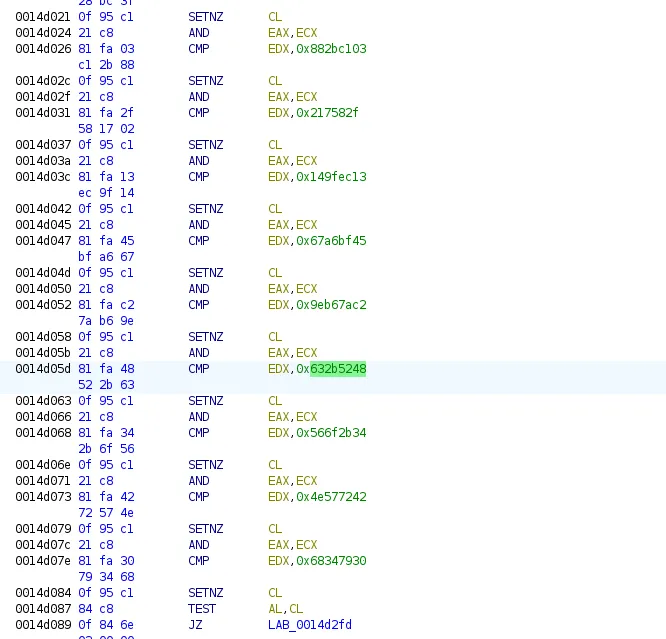
Apparently the loader does a header check where it checks for the first 4 bytes of the encrypted blob. In our case its HR+c and based on that decides whether to proceed decrypting or simply passing the code back to Zend.
Global XOR Helper
One function kept popping up across the loader. I first noticed it because so many code paths seemed to go through it before doing anything useful. After a closer look, it was pretty clear what it was doing. It takes the input, makes a copy, XORs the payload using a fixed 16-byte key, then keeps the decoded output around so the loader can reuse it later without decoding it again.
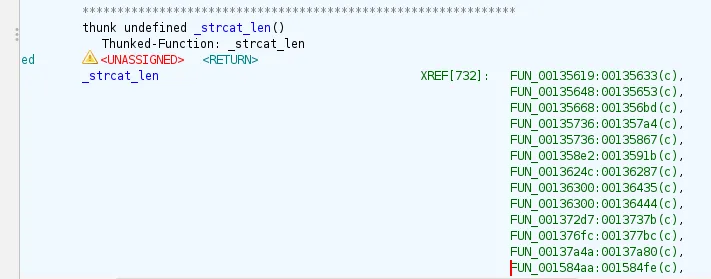
What this does is invoking a an XOR helper Qo9 which XORs the bytes using a global 16-byte key.
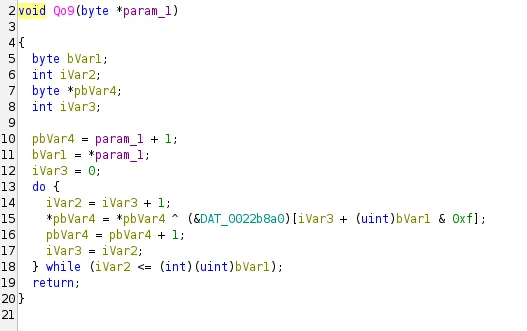
From here, any call to strcat_len becomes a good hint. It usually means there’s an encoded string nearby, and you can decrypt it straight from the data section. I have made a simple helper to decode entries on the fly:
KEY = bytes.fromhex("25 68 d3 c2 28 f2 59 2e 94 ee f2 91 ac 13 96 95")
def dec(b):
    l = b[0]
    out = bytearray(b)
    for i in range(l + 1):
        out[1 + i] ^= KEY[(l + i) & 0xF]
    return bytes(out)
enc = b"\x16\x1a\x4f\xfa\xce\x9d\xff\xc0\x6a\xb6\xe1\x4d\x1a\xbc\xb5\x08\x9d\x3b\x44\xf1\x8d\x86\xe2\xac\x00" # DAT_0022d61a
print(dec(enc))
#b'\x16Can only throw objects\x00\x00'
There are ~ 732 references to _strcat_len in this loader, and each one usually points to an encoded blob in the .data section. I wrote a small extractor and dumped the decoded strings.
[+] refs to _strcat_len: 732
[+] FUN_00135619: 0022d61a -> "__clone method called on non-object"
[+] FUN_00135648: 0022d640 -> "Can only throw objects"
[+] FUN_00135668: 0022d676 -> "get_class(): Argument #1 ($object) must be of type object, %s given"
[+] FUN_001584aa: 0022e570 -> "Call to a member function %s() on %s"
[+] FUN_00158af6: 0022d6f4 -> "Undefined variable $%s"
[+] FUN_00135736: 00230470 -> "strlen(): Passing null to parameter #1 ($string) of type string is deprecated"
[+] FUN_00135736: 0022e700 -> "strlen(): Argument #1 ($string) must be of type string, %s given"
...
The Hooks
Upon running ionCube, there are some checks happening to determine the exact version running. This is to determine whether the current version is supported. Its mainly done via via a quick parse of the version string and a couple of basic checks before it continues.
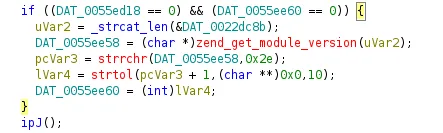
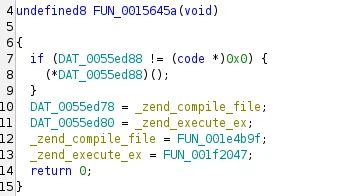
Once the version check passes, the loader hooks itself into the Zend engine by replacing two core function pointers:
zend_compile_file: the step where PHP turns a script into opcodes (Zend VM instructions).zend_execute_ex: the step where those opcodes are actually executed. From that point on, every compile and every execute flows through ionCube first.
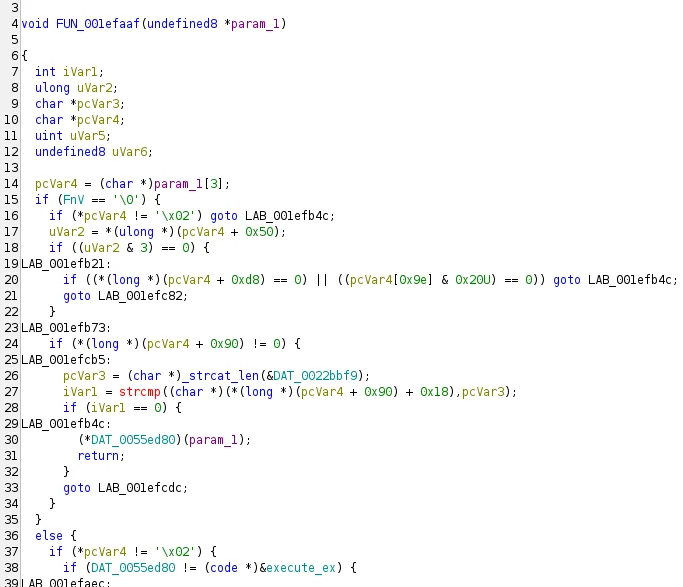
I followed the zend_execute_ex path, and it led me to FUN_001efaaf. It’s a big function, and it looks like one of the main places where the loader drives execution, basically handling the Zend VM instructions as they run.
Extracting the VM
The loader ensures everything gets executed with in itself without relying on the zend VM from the main PHP process, this means it has its own Zend functions that it invokes during runtime, depending on the piece of code its trying to execute.
The zend_execute_ex does a bunch of initialization stuff, followed by a call to internal_execute_ex which on its own does the heavy lifting

Which on its own does a bunch of operations to determine which Zend function it is going to dispatch
Followed by a call rax where RAX is going to be pointer to the dispatched function in the loader itself

Which in action, looks like this:
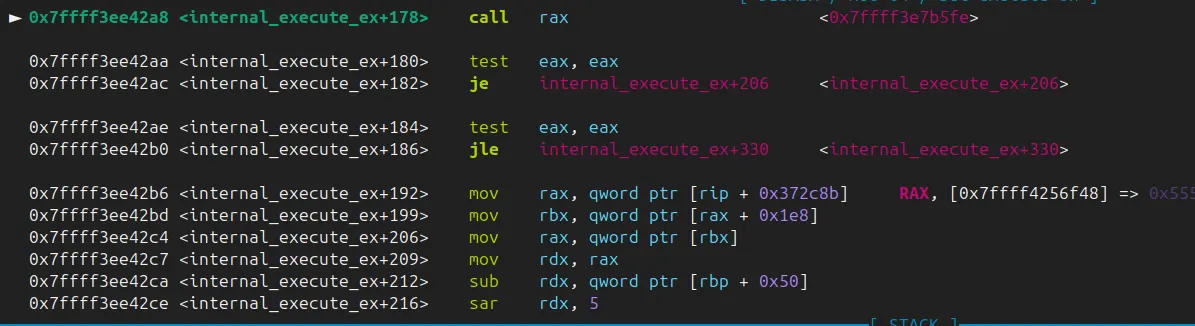
FUN_0017b5fe looks indeed like a Zend function, but there was no straightforward way to map out which Zend function is it.
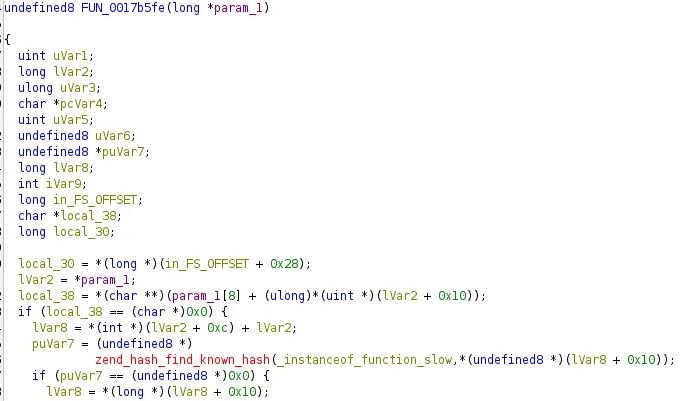
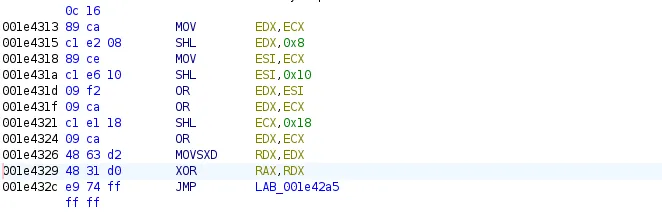
Going back to the XOR instructions shown above, they dictate which function is going to be called at rax, as it will be the result of the xor operation:
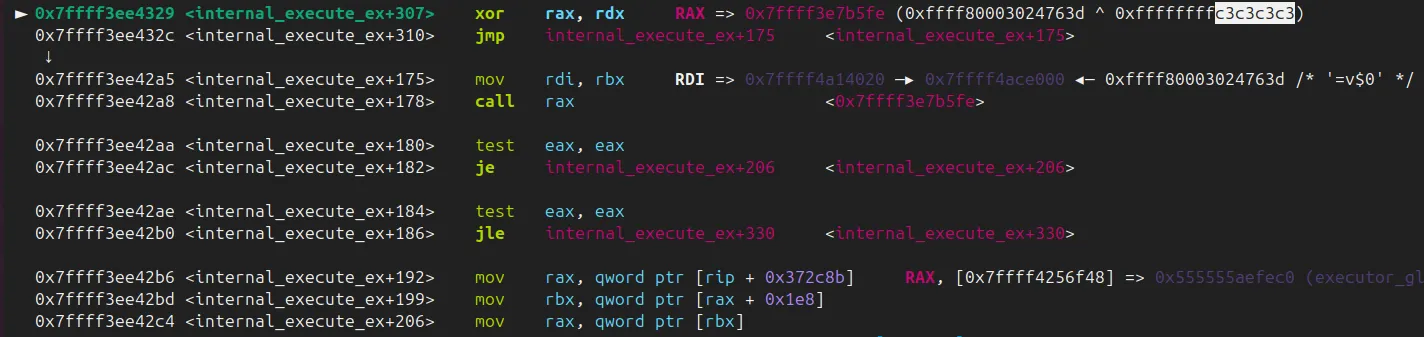
The explanation of the repeated byte in the xor key is this piece of code:
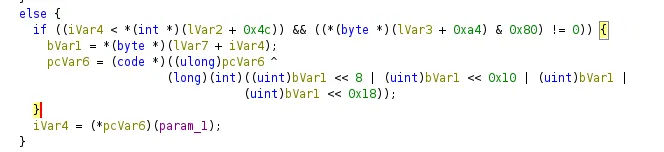
Each Zend opcode (zend_op) normally has a handler pointer that points straight to the function that implements that opcode. ionCube doesn’t want those pointers sitting in memory looking obvious, so it stores them “scrambled” (or at least this is the only explanation I’ve came up to).
They take one byte from a table (based on the current opcode index), then repeat it 4 times to build a 32-bit value, which essentially gets stored at RDX.
I’ve spent a decent amount of time trying to locate where exactly this table gets initiated, the scrambled symbols didnt help either, but it was essentially being established in the Wc9 function:
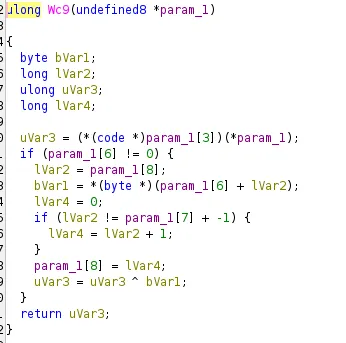
The function looks super innocent but upon digging, I’ve discovered that it stores the table of the keys.
I’ve decided to break right before the call operation.
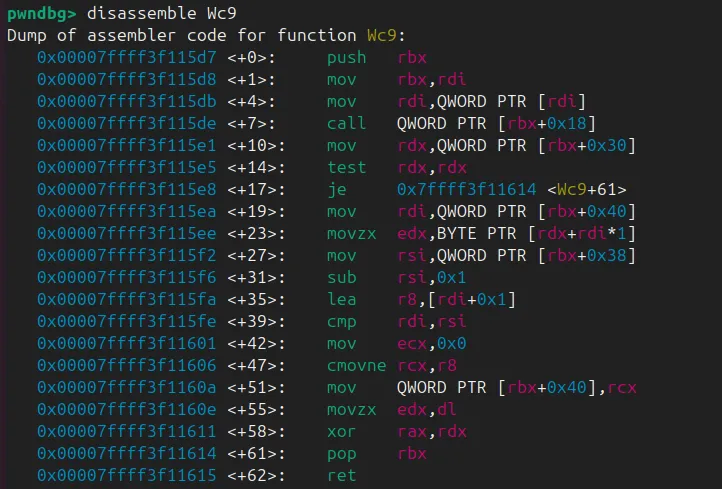
at that point, rbx+0x18
0x7ffff3f115de <Wc9+7> call qword ptr [rbx + 0x18] <0x7ffff3f111ad>Which apparently shows the pointer is a function that does an XOR operations too:
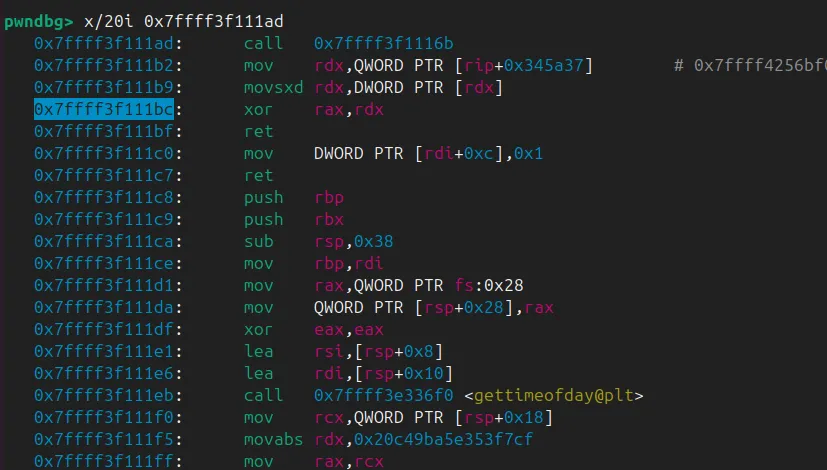
At 0x7ffff3f111bc: xor rax, rdx
RAXis the PRNG output(changes every call)RDXis the constant per-request mask

The c3c3c3 pattern we’ve seen earlier before the call rax is the lower bit of the XOR result. At this stage, r12 is a pointer to the table buffer:

At this point, we at least have a rough idea of how the XOR table is built and how it ends up being used during decoding. It’s enough to start making sense of the strings and some of the blobs we see.
Mapping The Dispatched Addresses
Before we map the dispatched addresses, we need to talk about zend_op. If you have ever looked at PHP internals, this is the struct that represents a single opcode, basically one instruction in the VM.
struct _zend_op {
	const void *handler;
	znode_op op1;
	znode_op op2;
	znode_op result;
	uint32_t extended_value;
	uint32_t lineno;
	uint8_t opcode;
	uint8_t op1_type;
	uint8_t op2_type;
	uint8_t result_type;
};
Most opcode names are pretty literal, so you can often guess what a chunk of code is doing just by reading the sequence. Those are defined in the zend_vm_opcodes.h file, and it’s worth mentioning that they vary depending on PHP versions.
#define ZEND_NOP                          0
#define ZEND_ADD                          1
#define ZEND_SUB                          2
#define ZEND_MUL                          3
#define ZEND_DIV                          4
#define ZEND_MOD                          5
#define ZEND_SL                           6
#define ZEND_SR                           7
...
#define ZEND_FETCH_GLOBALS              200
#define ZEND_VERIFY_NEVER_TYPE          201
#define ZEND_CALLABLE_CONVERT           202
#define ZEND_BIND_INIT_STATIC_OR_JMP    203
A question I’ve had was where exactly was ionCube initiating that table and how exactly does it map it to each of the zend_op. This actually also goes back to the initialization and version check part where it uses a function that initaties a chunky table called ipJ:
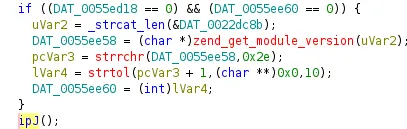
ipJ copies two important pointers into global slots the rest of the loader uses:
- one to Zend’s giant array of opcode handler addresses
- and one to Zend’s spec table that describes how opcodes are specialized
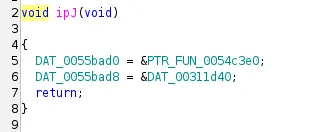
After ipJ runs, every place in the loader that needs to look up or patch an opcode can just index into DAT_0055bad0/DAT_0055bad8 instead of chasing PHP internals.
ipJ copies Zend’s handler array and spec table into the loader’s globals; the array looks massive because Zend registers dozens of variants per opcode (different operand types, observer/retval flags, optimized hot paths).
Mapping it is just a matter of using Zend’s own specs[] offsets to split the array into per-opcode blocks and then matching each pointer to the function at that RVA (FUN_001f0f93, etc.) from the decompilation.

Which in action, looks like this:
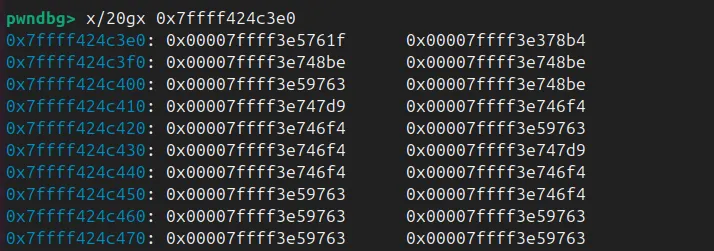
That 0x7ffff424c3e0 buffer is what ipJ ends up wiring into DAT_0055bad0. It’s basically the live zend_opcode_handlers[] table. Each 8-byte slot is just a pointer to a handler, and each handler is a specific “flavor” of an opcode.
You will also notice repeated pointers like 0x7ffff3e748be, which show up for a bunch of optimized variants. The reason this table is so big is that Zend does not have “one handler per opcode”. It has many specializations per opcode, depending on operand types. The specs[] data is what tells you which chunk of entries belongs to which opcode.

In my run, that big wall of 32-bit values at 0x7ffff4011d40 looks like Zend’s zend_spec_handlers[] table. It’s the same kind of data PHP uses when it builds opcode handlers (the path behind zend_vm_set_opcode_handler()).
Each entry is basically two things packed into one value:
- The low 16 bits point to the first slot for that opcode inside
zend_opcode_handlers[]. - The upper bits are the
SPEC_RULE_*flags that describe what kind of specialization applies (which operand patterns exist, and how many handler variants Zend generated). That lines up with how Zend picks the handler:
op->handler = zend_opcode_handlers[
    zend_vm_get_opcode_handler_idx(zend_spec_handlers[opcode], op)
];
To sanity check the mapping, I traced one opcode by hand.
Opcode 1 is ZEND_ADD. Basically, read specs[1], took the low 16 bits, and got 1, meaning its handler block starts at slot 1. Slot 1 in the handler table (handler_base + 1*8) points straight to the function that runs for that opcode.
This way we can build a map of each pointer and its corresponding VM, I automated the process and came up with something similar to:
{
  "index": 0,
  "handler_label": "ZEND_NOP_SPEC_HANDLER",
  "handler_rva": "0x5761f",
  "handler_va": "0x15761f",
  "handler_runtime": "base+0x5761f",
  "binary_function": "FUN_0015761f",
  "opcode": 0,
  "zend_name": "ZEND_NOP"
},
{
  "index": 1,
  "handler_label": "ZEND_ADD_SPEC_CONST_CONST_HANDLER",
  "handler_rva": "0x378b4",
  "handler_va": "0x1378b4",
  "handler_runtime": "base+0x378b4",
  "binary_function": "FUN_001378b4",
  "opcode": 1,
  "zend_name": "ZEND_ADD"
},
...
{
  "index": 1519,
  "handler_label": "ZEND_INCLUDE_OR_EVAL_SPEC_CONST_HANDLER",
  "handler_rva": "0xf17e6",
  "handler_va": "0x1f17e6",
  "handler_runtime": "base+0xf17e6",
  "binary_function": "FUN_001f17e6",
  "opcode": 73,
  "zend_name": "ZEND_INCLUDE_OR_EVAL"
},
{
  "index": 1520,
  "handler_label": "ZEND_INCLUDE_OR_EVAL_SPEC_OBSERVER_HANDLER",
  "handler_rva": "0xf1381",
  "handler_va": "0x1f1381",
  "handler_runtime": "base+0xf1381",
  "binary_function": "FUN_001f1381",
  "opcode": 73,
  "zend_name": "ZEND_INCLUDE_OR_EVAL"
},
From here, you can probably see where this is going. I use this mapping to figure out which Zend handler gets called, and pull the related zend_string when there is one. Once you can do that consistently, you stop guessing and start reading the real logic of the application.
VLD is a PHP extension that prints the opcodes Zend generates when it compiles a PHP script. It’s a nice reference point because it shows the “plain” compiled ops, without you having to reverse anything. If you run it with vld.execute=0, it dumps the op array and stops.
Here’s the exact tiny file you used:
<?php
for($i=0; $i<3; $i++){
    echo "hi";
}
?>
When you run VLD with execution disabled, it stops after compilation and dumps the opcodes. The output is short, but it already captures the full control flow: initialize $i, jump into the loop, echo the constant string, increment, compare, jump back, then return.
root@a1220a528392:/work# pecl install channel://pecl.php.net/vld-0.19.1
downloading vld-0.19.1.tgz ...
...
$ php -dextension=vld.so -dvld.active=1 -dvld.execute=0 hi_orig.php
Finding entry points
Branch analysis from position: 0
1 jumps found. (Code = 42) Position 1 = 4
Branch analysis from position: 4
2 jumps found. (Code = 44) Position 1 = 6, Position 2 = 2
Branch analysis from position: 6
1 jumps found. (Code = 62) Position 1 = -2
Branch analysis from position: 2
2 jumps found. (Code = 44) Position 1 = 6, Position 2 = 2
Branch analysis from position: 6
Branch analysis from position: 2
filename:       /work/hi_orig.php
function name:  (null)
number of ops:  7
compiled vars:  !0 = $i
line      #* E I O op                               fetch          ext  return  operands
-----------------------------------------------------------------------------------------
    2     0  E >   ASSIGN                                                       !0, 0
          1      > JMP                                                          ->4
    3     2    >   ECHO                                                         'hi'
    2     3        PRE_INC                                                      !0
          4    >   IS_SMALLER                                                   !0, 3
          5      > JMPNZ                                                        ~3, ->2
    5     6    > > RETURN                                                       1

branch: #  0; line:     2-    2; sop:     0; eop:     1; out0:   4
branch: #  2; line:     3-    2; sop:     2; eop:     3; out0:   4
branch: #  4; line:     2-    2; sop:     4; eop:     5; out0:   6; out1:   2; out2:   6; out3:   2
branch: #  6; line:     5-    5; sop:     6; eop:     6; out0:  -2
path #1: 0, 4, 6,
path #2: 0, 4, 2, 4, 6,
path #3: 0, 4, 2, 4, 6,
path #4: 0, 4, 6,
path #5: 0, 4, 2, 4, 6,
path #6: 0, 4, 2, 4, 6,
VLD is still useful here, but only as a reference on plain PHP. Once ionCube is in the picture it stops being an option. In our environment, enabling VLD alongside the ionCube loader just segfaults :(.
A small Python hook was built for GDB to log what actually gets dispatched during execution. The hook reads the current handler address and maps it back to a readable Zend handler name using a JSON table (handler labels + RVAs). When the opcode has an attached zend_string (like constants passed to echo), the hook prints that too.
...
LIB = "ioncube_loader_lin_8.3.so"
OFF = 178
MAP = {int(x["handler_rva"], 16): (x["zend_name"], x["handler_label"])
for x in json.load(open("opcode_handler_full.json", "r", encoding="utf-8"))}

class IonBP(gdb.Breakpoint):
def stop(self):
rax = int(gdb.parse_and_eval("$rax"))
...
A quick sanity check uses the same tiny loop in plain PHP. VLD gives the expected opcode sequence:
(gdb) source hook.py
[ionrax] armed. run/continue; will hook when ioncube .so loads.
(gdb) r
Starting program: /usr/bin/php -c php_ioncube.ini hi.php
[Thread debugging using libthread_db enabled]
Using host libthread_db library "/lib/x86_64-linux-gnu/libthread_db.so.1".
[ionrax] JSON=/resarch/ioncube/opcode_handler_full.json
RAX=0x7ffff3ed434f ZEND_ASSIGN
RAX=0x7ffff3e81b15 ZEND_JMP
RAX=0x7ffff3e9b20f ZEND_IS_SMALLER
RAX=0x7ffff3e60520 ZEND_ECHO | op1_str:zs:0x7ffff4a029e0 "hi"
hiRAX=0x7ffff3ebe39b ZEND_PRE_INC
RAX=0x7ffff3e9b20f ZEND_IS_SMALLER
RAX=0x7ffff3e60520 ZEND_ECHO | op1_str:zs:0x7ffff4a029e0 "hi"
hiRAX=0x7ffff3ebe39b ZEND_PRE_INC
RAX=0x7ffff3e9b20f ZEND_IS_SMALLER
RAX=0x7ffff3e60520 ZEND_ECHO | op1_str:zs:0x7ffff4a029e0 "hi"
hiRAX=0x7ffff3ebe39b ZEND_PRE_INC
RAX=0x7ffff3e9b20f ZEND_IS_SMALLER
RAX=0x7ffff3edd3d2 ZEND_RETURN
...
Exploitable?
Part of the ionCube loader is that it registers extra PHP functions inside the process. Two of them stood out: _dyuweyrj4r and its “brother” _dyuweyrj4 (same name, just without the last r). They look almost identical and they both start with the same pattern.
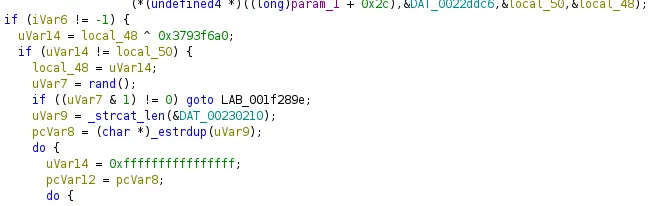
Both functions parse two arguments, then apply a simple gate using a hardcoded constant 0x3793f6a0. The check is basically:
- take the second argument
- XOR it with
0x3793f6a0 - compare it to the first argument
- if it does not match, prints a weird message
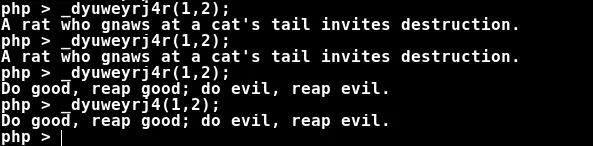
So it acts like a cheap handshake. It is not strong protection. It just makes accidental calls less likely.
Once the check passes, things get interesting. The first argument is treated like a real pointer and gets dereferenced. There is no safety net around it. In the crash below, r13 ends up holding the first argument, and the loader immediately touches [r13 + 0x70]:
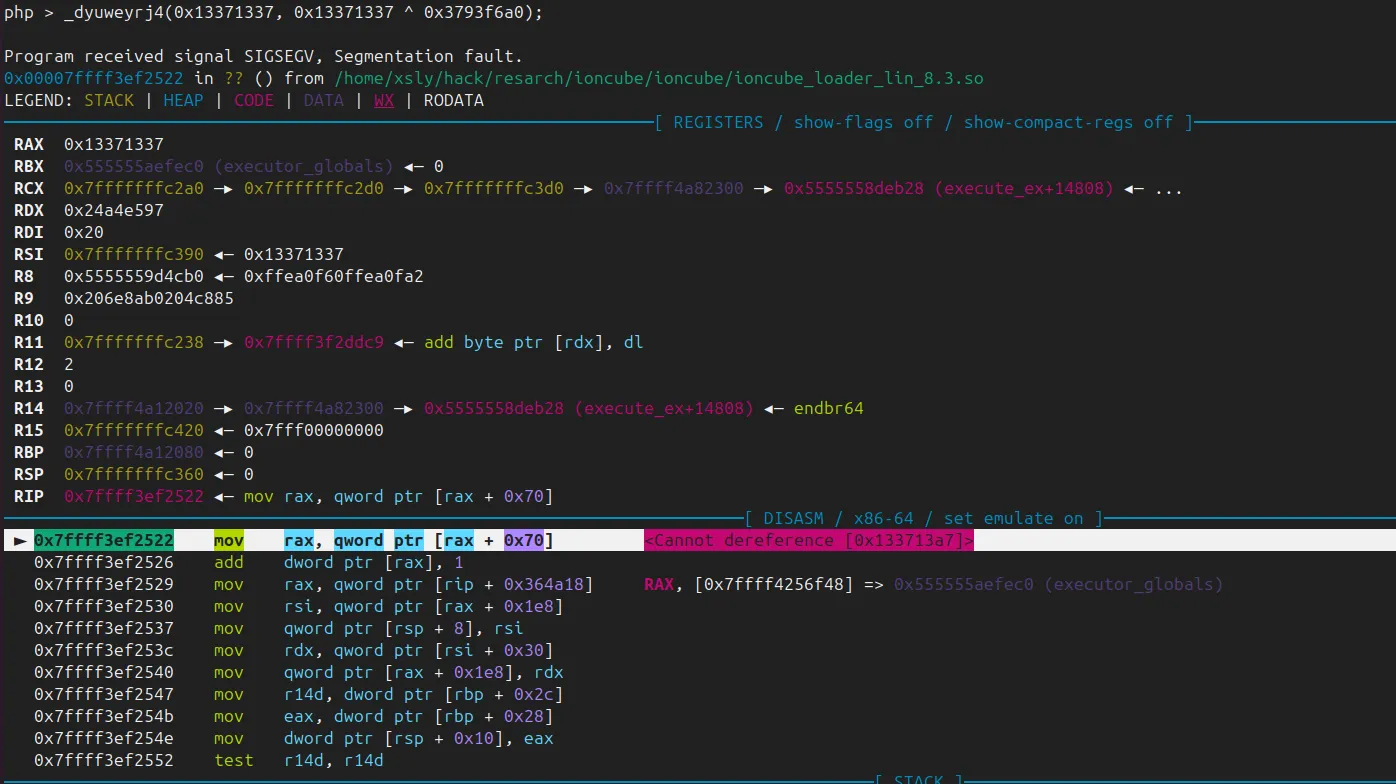
If these functions are reachable from untrusted PHP code, this is at minimum a clean denial of service. It crashes the PHP worker on demand. Depending on how realistic it is to point r13 at a valid structure, it can also become more than “just a crash”, since the code keeps going and performs more reads and writes relative to that pointer.
The two functions are basically twins, but they don’t take the exact same route. _dyuweyrj4 leans on Zend a bit more and calls zend_init_execute_data(...) before it goes into internal_execute_ex(). _dyuweyrj4r does more of that setup on its own, then jumps into internal_execute_ex() afterwards. Same gate, same end result, just a slightly different setup path.
Conclusion
We really hope this saves someone a lot of guesswork. If you end up with an ionCube blob during an audit, the fastest path is usually not “recover the source”. It’s understanding how the loader drives Zend, then tracing what actually runs.